HOW TO PUT IPHONE INTO DFU MODE

First Step to upload custom firmware on iPhone.

IPHONE TETHERING ON VODAFONE INDIA !

Get Vodafone India iPhone Mobile Settings here.

JAILBREAK IPHONE ON IOS7

Steps on how to Jailbreak iPhone on Firmware v7

DOWNGRADE BASEBAND

Downgrade for iPhone 3GS/3G

CONFIGURE GMAIL ON IPHONE

Now its easy to setup gmail account.

Showing posts with label Repositories. Show all posts

16 November 2010

Android 2.2.1 (Froyo) on iPhone 3G / 2G with Bootlace

How to install Android 2.2.1 Froyo on iPhone using Bootlace without a computer. Bootlace 2.1 lets you install Android 2.2.1 on iPhone 3G / iPhone 2G without any need of a computer using an installer available in Cydia.


Requirements

  • iPhone 3G: iOS 4.1, 4.0.1, 4.0.2, 4.0, 3.1.3 and 3.1.2, , 4.0, .1, 4.0.2.
  • iPhone 2G: iOS 3.1.3 and 3.1.2.
  • Your iPhone Must be jailbroken. Bootlace currently supports the following Jailbreak tools:
    • PwnageTool
    • RedSn0w
    • Blackra1n

How to Install Android on iPhone using Bootlace

We assume that your iPhone 3G/2G is already jailbroken using the above mentioned jailbreak tools.

Step 1

Open Cydia. Go to Manage > Sources and add the following Source/repo:
http://repo.neonkoala.co.uk
Step 2
Once you’ve added the above mentioned repo, go to Search tab, search for Bootlace and install it.
Step 3
  • When done, press the Home button to close Cydia. Now open Bootlace from your iPhone Springboard.
  • Bootlace will download the kernel and patch it then.
  • Once done, Reboot your iPhone.
Step 4
  • Open Bootlace. Hit the OK button.
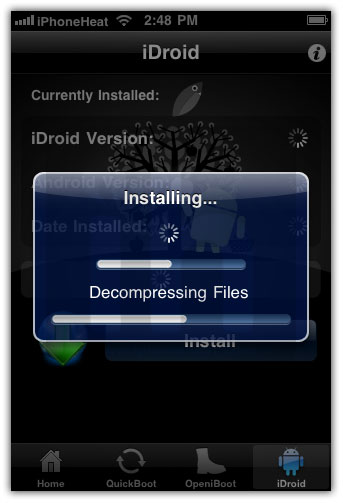
  • Select iDroid tab at bottom and then hit the Install button.
install android 2.2.1 froyo on iPhone

Step 5

Tap the OK button. Bootlace will download and install android on iPhone.
install android 2.2.1 froyo on iPhoneinstall android 2.2.1 froyo on iPhoneinstall android 2.2.1 froyo on iPhone

Step 6

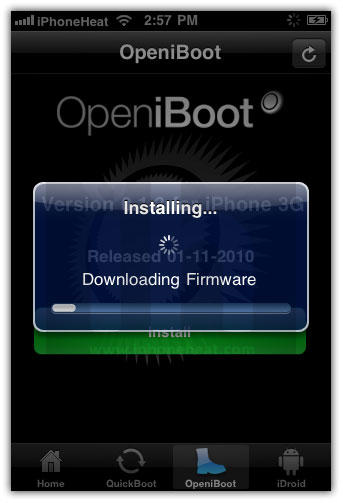
Once the Android installation process is completed, go to OpeniBoot tab at bottom and hit the install button.
install android 2.2.1 froyo on iPhoneinstall android 2.2.1 froyo on iPhoneinstall android 2.2.1 froyo on iPhone

Step 7

  • Once done, tap on the Configure button.
  • Make your choice, and hit save button.
install android 2.2.1 froyo on iPhone
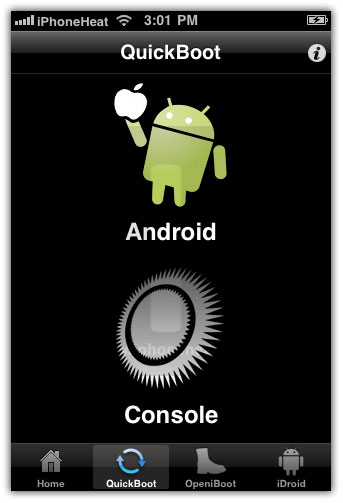
Go to Quickboot tab and tap on Android to boot your iPhone into Android 2.2.1 Froyo.
install android 2.2.1 froyo on iPhoneinstall android 2.2.1 froyo on iPhone
Future Android for iPhone updates can be found under iDroid tab (Step 4).

04 October 2009

Add Repositories in Cydia

1. Connect your iPhone through internet.
2. Open Cydia Apps in iPhone.
3. Wait till it loads properly and then click on modify tab in  the bottom.
4. Select Sources and then you will be able to see different sources in it.
5. On the Top right corner Click on the Add button and then enter the repository you need access to i.e. http://cydia.xsellize.com/
6. Click on Done and then go to sections and look for new apps inside this repository.


You can Install Repositories too !


1. Open Cydia and under sections in the bottom, look for Repositories.
2. Different Repositories are mentioned there. The one you need it select that and install it. Install button will be on the Top right corner.

Twitter Delicious Facebook Digg Stumbleupon Favorites More